
"Hey Claude, create me the blueprint of an F35 jet engine. And make no mistakes."
We all understood what vibe coding is. We all used LLMs and other GenAI services. But I still often see a lack of understanding in proper prompting. Now, I admit, even with proper prompt etiquette (aka prompt engineering) you will not be able to get an engine blueprint. You will be more efficient in using LLMs, though.
When people write code using AI, they tend to fall into two categories: the cliché vibe-coder or the over-engineer.
LLMs: Vibe Coding vs Over-Engineering
Vibe Coding | Over-Engineering |
|---|---|
No structure, you just go with the vibe | You think too complex and overload the AI with context |
Hard to maintain if you add more features | Slow to build (if you even start with it) |
You are collecting technical debts like pokemon cards | Hard to change once you realize midway through, that your architecture has flaws |
It's so fragile that it breaks easily (like moving a picture in Word) | You have a lot of token overhead |
→ Both of those types result in no product getting shipped.
I think the definition of "vibe coding" started with Andrej Karpathy
There's a new kind of coding I call "vibe coding", where you fully give in to the vibes, embrace exponentials, and forget that the code even exists. [...] I ask for the dumbest things like "decrease the padding on the sidebar by half" because I'm too lazy to find it. I "Accept All" always, I don't read the diffs anymore. When I get error messages I just copy paste them in with no comment, usually that fixes it. [...] Sometimes the LLMs can't fix a bug so I just work around it or ask for random changes until it goes away. [...] I just see stuff, say stuff, run stuff, and copy paste stuff, and it mostly works.
And this perfectly summarizes it. You enter a vague prompt of what you want, and in a matter of seconds or minutes, you already see the first result. You are amazed by the speed and how smoothly everything works. You try to add more functionality or improve things, but now something breaks. Which leads to a loop where you try to fix the issue also with AI. Now you are debugging code that you didn't write nor fully understand. You look at solutions that you can't fully explain either, since you didn't write those ones either.
You end up in a loop and your prompts are getting... a bit more aggressive(?) and you become frustrated. So you throw away the code. On the next attempt, you try to control everything. This time, you want to make sure everything works properly. So you already start with a folder structure that you created, you prepared architecture docs, maybe you went even so far into detail that you defined a naming convention for your variables. You feed all of this context into the AI and hope that it will create everything as you wish.
Okay, but now your chat context is full, and you have to add all the context into a new chat after just a few prompts. The AI loses overview, and you lose track of what information you already gave. The AI is building, but it somehow doesn't feel right, and you don't get exactly the results you were expecting. Because you basically limited the AI to your own knowledge. Too many constraints, rules, architecture plans. You don't allow the AI to do what it is best at: generating stuff (generating stuff based on a huge training dataset, to be more specific). In other words, the LLM knows how feature X should be written based on having knowledge about thousands and thousands of apps, and knowing how their code compares to each other. But now you are telling it to write Feature X based on your (maybe) limited skillset.
In simpler words; you want a Ferrari (hopefully not a Ferrari Luce), but give it the architecture plan of a Lada.
And that's the problem with some devs: you are thinking more about the code itself, the ifs and elses and loop types, than about the behavior of the code.
→ Because; if you know how the exact code should look like, save the tokens and just write it yourself.
Change Your Approach
If you want to efficiently vibe code, don't tell the AI how the code should look, but rather how the feature should behave.
- What already works and must stay the same
- What is allowed to change
- What is off-limits?
Speed and efficiency are good. But without direction you'll end up in chaos, and with too many restrictions, you'll end up limited by your own knowledge. So what should you do then?
Try to give just enough structure and context so that the LLM understands what you want to build. Describe what results you want to see and how the app should behave. Build only feature by feature. Don't expect a whole functioning app with just one prompt.
For providing context I recommend AGENTS.md. This is basically a README for AI agents. There you can write things such as:
- What you are building
- How your project works
- What stack you are using
- What rules to follow
This can/should also be a living document. If your rules change during development, update the AGENTS.md. This will also save you from wasting more tokens by adding the same context over and over into your sessions.
(You can even create the AGENTS.md file with an LLM).
How to Vibe Code properly?
Build feature by feature, work task by task. As said, don't expect a whole functioning app with 2-3 prompts.
What NOT to do:
Build me a website with a fully integrated CMS. It should have a home page, contact form, about us page, and should also have an authenticated user area. Also build the authentication with Clerk. The main color of the website should be green, by the way, with yellow accents.Let's break apart this example. Besides the ugly color choices, there are some issues. Remember: task by task. With the example of a website or web app, it would make sense to create a Design Kit first. Try to find your font, the colors, and design elements which match your style. Based on that, you can create a UI Kit. Here I made an example with the fonts of CYBIQ:
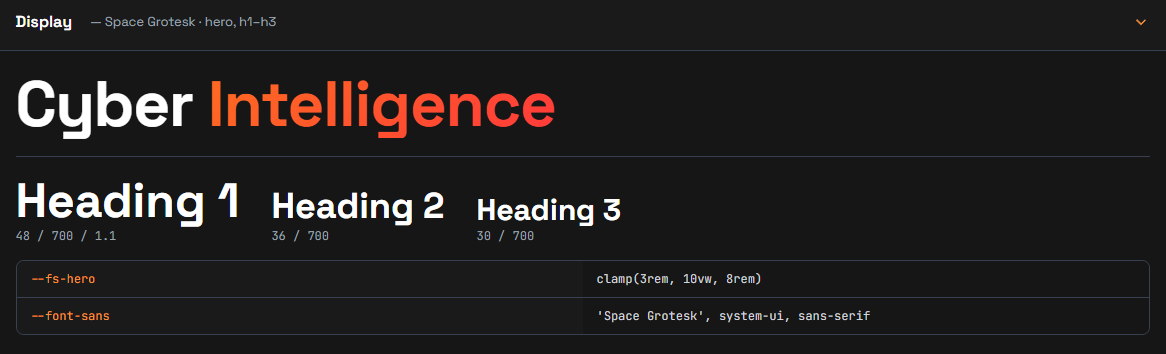
After that, you can write in your AGENTS.md to follow the design elements in your UI Kit file (+ "if needed, create matching components which do not exist yet").
Based on this principle you can continue with the homepage. You can even add a wireframe sketch here or inspiration examples (this way it will also not end up looking like a generic AI website). I think you get the idea.
And then the most important step: read the code! You don't have to go through it line by line. But check the overall functionality and logic. Challenge it if you see something strange. Test the workflows.
Also powerful: "If anything is unclear, ask before implementing."
So the better example from above would be something like:
Read AGENTS.md first and follow it strictly.

Create the home page first. Attached you will also see a wireframe sketch of how the page should look. Use only the UI style which I have already defined and provided. If components are missing, you can create and update the Design Kit, but do not change anything that is already given.

If anything is unclear, ask before implementing.→ Especially the last part ("...ask before implementing") is very powerful.
Troubleshooting Vibe Code
Okay, but what if something still breaks? Well, that's part of software development since the very beginning and will always happen.
The secret weapon is:
print("---- check here ----")Well, at least this was the case in times when I was writing spaghetti code. Let's return to the age of AI:
- State the problem
- State the correct behavior
- Optionally add a constraint so other parts don't break while bug fixing
An example (assuming you already have a well-written instructions file):
Read AGENTS.md first and follow it strictly.

The burger menu on mobile devices is not working. When I click on it, it should open the menu in responsive design. Currently nothing happens.

On desktop view the header and menu items work properly. Do not change anything on this view.Something that is often overlooked is "constraints". Protect what already works! Tell the AI not to touch it:
- "Do not change my UI components."
- "Preserve the authentication function and don't change anything about it."
- "Don't add anything new into the workflow of customer onboarding."
If you encountered bugs and problems, solve them once, and document them (with an actual root cause) so they never happen again.
Don't skip the Basics
Yes it's cool to ship faster than ever before. But do not forget the basics; Testing, Security, Functionality.
Your shiny new solution might have huge issues in the backend, with the workflow or even worse, with security. Each of those topics could take a whole article itself. But in short: VERIFY the generated solution. Challenge it and test it.